AutoShrine Advertising Center

There are several ways to advertise your business on Two Stroke Smoke depending on your budget, your goals, and how you interact with this website.

Please read the advertising options and information below carefully.
This page is for automotive businesses that wish to advertise on Two Stroke Smoke.
→ If would like to become a Supporting Member, please visit your Membership Status Page.

From this page, you can advertise your business or product on any or all of the following AutoShrine Network websites:

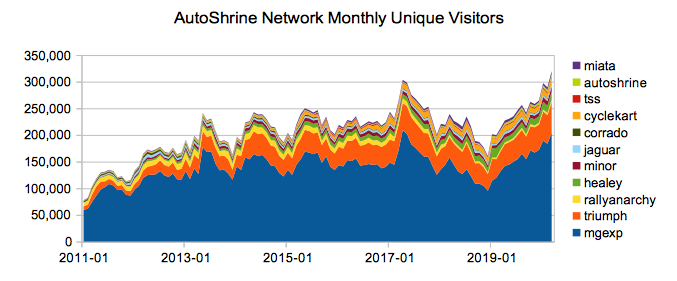
The MG Experience ... The Triumph Experience ... The Jaguar Experience ... The Morris Minor Forum ... The Austin-Healey Experience ... The Mini Shrine ... Series Land Rover ... Ford First ... VW Corrado World ... The Trabant Registry ... MX-5 Miata World ... Toyota MR2 World ... The Alfa Romeo Experience ... The Kappa Registry ... Two Stroke Smoke   — combined delivering over 2 million page views per month!

Confused by all of this? If you have any questions, contact the webmaster and include your Member ID in the email.
Your Member ID can be found at the top of your Member Home Page

Your contribution covers operational costs and funds future website development. Thank you for your support!

Important Notes: Advertising your business, product or services in the Forums via any method other than those described below is prohibited as per the Forum Rules. Posts will be removed without notice and repeat offenders may have their accounts disabled. Purchasing advertising on this website does not grant you permission to actively solicit business or provide customer support on this website except where noted. If a member posts a question asking where they can find a certain part or product, Platinum or Gold Members or Banner Advertisers may post ONE reply (or PM) per thread to solicit a sale. In addition, Platinum or Gold Members or Banner Advertisers may create new topics (max one per week) about parts sales, specials, new parts etc in the Vendor Forum.

1. Banner Advertising (Site Sponsor)

If you would like your advertisement to be viewed up to 1 million times per month †, you can display a banner ad image (Half Banner 234x60) for your business at the top of the Forum List, Forum Index, and Forum Read pages; an example screenshot is shown below. If your account balance has sufficient funds, your banner ad is automatically enabled for display and account debited at the start of each month. You can change the banner image, link destination, and descriptive text at any time via this web interface.

Your banner will also be shown prominently on the Front Page, in the Two Stroke Smoke Store and the Link Directory.

No Supporting Membership level (Gold, Silver, etc) is required to purchase Forum Banner Advertising.
Forum Banner Advertising is charged separately from Site Membership.

Sign In or Register to see ad rates, view your advertising balance, or make a payment.


Please note that the webmaster reserves the right to remove or modify your banner image.
Do not upload animated or adult content banners, or any image that violates the Forum Guidelines or Terms of Service.

Example Forum Banner Ad Placement (3x Half Banner 234x60):

Banner Placement Example

Estimate only. Ads are displayed in a random order and number of active banners in a given month will determine actual impressions.

2. Member Services Directory

In the Link Directory of this website is the Member Services section, a listing of products or services that members of the website offer to other members.
If you have a Silver Membership or higher, your service will be shown in that section.

Sign In or Register to edit your Member Services link.

Please note that the webmaster reserves the right to remove or modify any Member Services link.
Make sure it is relevant to this website, and does not violate the Terms of Service.

3. Forum Signature Advertising

Sign In or Register to view your forum signature status.

If you have a business link in the Link Directory and a Gold Membership or higher, your service will be shown automatically below all of your forum posts. This provides an easy method of advertising your service to fellow enthusiasts.

Example Forum Signature ad placement:

Forum Member Servcies Display Example

4. Targeted AdWords Advertising (Advanced)

If you wish to display a banner image ad or a more advanced text ad, please read this section.

Google AdWords is the primary source of advertising on this website and all the sites in the AutoShrine Network.

By using Google AdWords, you get fine control over your advertising budget, the ability to display your ads only to certain geographical regions or audiences, or only on pages containing specified keywords (for example, only on pages that mention products relevant to your business). You also get an advanced reporting interface to track the number of impressions, clicks and conversions your ads are generating.

To display your ad on any of the ASN sites, you will need to have a Google AdWords account, then create a campaign using placement targeting as described in the steps below.

The following sites may be targeted via AdWords:

Click on a site name to be taken to the DoubleClick Ad Planner for that website.

Channel Name Channel ID Domain Name Monthly Page Views †
All AutoShrine Network Sites 6703259145 *everything below* 1.5 million
The MG Experience 3211451629 mgexperience.net 1.4 million
The Triumph Experience 9685318642 triumphexperience.com 52,000
Rally Anarchy 7110298776 rallyanarchy.com 35,000
Corrado World 1299287691 corradoworld.com 7,000
MX5 Miata World 8184667824 mx5world.com 5,000
The AutoShrine 4513916436 autoshrine.com 4,200
The Jaguar Experience 6413656548 jaguarexperience.com 2,000
Ford First 1486067532 fordfirst.com 1,000
The Mini Shrine 3506743324 minishrine.com 1,000
Two Stroke Smoke 1495202146 twostrokesmoke.com 500
The Kappa Registry under construction kapparegistry.com -

† Approximate impressions per month, as of October 2010.

To advertise on this site, please follow the following steps:

  1. Sign in or create a new account at Google AdWords
    You will be required to make an initial deposit to your account or enter a credit card.
  2. Create a new Placement Targeted AdWords Campaign.

    01 Create Campaign

    Note: If you only want your ad to display on the websites that you select, in the Campaign Settings tab, use the following settings:

    02 Choose Networks
  3. Navigate to the Network tab for your new Campaign and show the Managed placements section if it is hidden.

    03 Managed Placements
  4. Click the "+ Add Placements" button.
  5. Enter the domain names from the table below for all the sites you wish to advertise on.
    For example, to advertise on The MG Experience and The Triumph Experience, you would enter the following:

    04 Add Placements

    Then click the "Save" button.
  6. Your ads should begin to appear on the sites shortly, depending on your campaign budget.
    Check your campaign statistics in 12 to 24 hours to verify they are being displayed and check their performance.

If you have any questions, please contact the webmaster.

Join Us Today!

Not a member yet? Sign up now for your FREE account!
Members Sign In:


Tip: You can sign in to any AutoShrine website with the same ID and password.

TSS Menu

Front Page

Membership

Forums

Live Chat

Calendar

Library

Journals

Registry

Scooters For Sale

Model Pages

Motorsport

Directory

Clubs

Store

Search

Promote YOUR Business or Product on this Website!
Advertising Info

Adjust Text Size

Larger Smaller
Reset Save